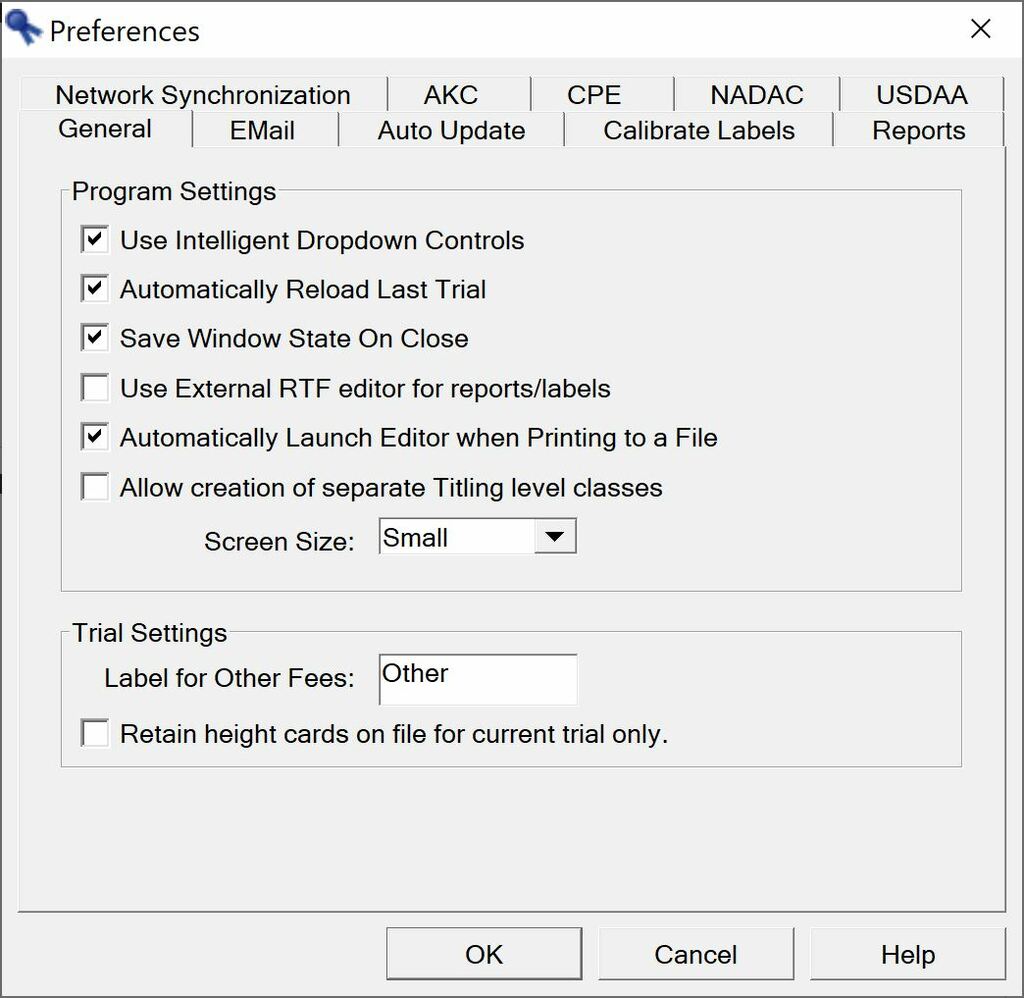
The Preferences screen sets application settings that impact how the program reacts and allows you to modify the default behavior of AGTSec.
These are the General settings that will impact how AGTSec runs generically and impact the current trial:
Use Intelligent Dropdown Controls - allows you to tab to a combo box and begin typing to have matching item automatically selected.
Automatically Reload Last Trial - when starting AGTSec, the last selected trial will automatically be selected and opened (if found). If this option is off, you will have to select the current trial every time you start AGTSec.
Save Window State on Close - will save the location of the AGTSec window so that AGTSec will start back up in that exact same location (as long as it is visible on one of your displays).
Use External RTF editor for reports/labels - AGTSec custom reports get automatically generated in RTF (Rich Text Format). If you have your own word processor you prefer to use when editing reports or viewing generated reports select this option and the program associated with .rtf file extension will be automatically launched.
Automatically Launch Editor when Printing to a File - if you have a program associated with the .pdf file extension, AGTSec will launch that program with the generated report if you select "Output to a File" on any of the print menus.
Allow creation of separate Titling level classes - this is typically for the lowest level class in an organization (Novice A/Novice B in AKC, Starters/Novice in USDAA). This option is very rarely used.
Screen Size - allows to select larger screen sizes for high-resolution displays.